1.Assign a static IP to the PC (e.g., 192.168.1.100).
2.Set the subnet mask (e.g., 255.255.255.0).
3.Leave the default gateway field empty.
4.Leave the DNS server fields empty.
1.Assign a static IP to the PC (e.g., 192.168.1.100).
2.Set the subnet mask (e.g., 255.255.255.0).
3.Leave the default gateway field empty.
4.Leave the DNS server fields empty.
Complain: I having to restart after each boot up as on first (cold) start since this update the keyboard on Lenovo laptop does not work. But when I reboot , the keyboard is back to normal.
Solution: This is a common driver compatibility issue. Please try disabling Fast Startup.
Disabling Fast Startup means your computer will take a little longer to boot up, but it can help solve various issues related to updates and hardware compatibility. To completely fix this issue, you may need to wait for system and driver updates.

Run “Windows Powershell ” as Admin;
Check Bitlocker Status “manage-bde -status”;
“Disable-BitLocker -MountPoint DriveName:” (replace DriveName with your C:, D:.etc)
“Manage-bde -off Drivename:”


Run ” CMD” as Administrator, the run the command:
wmic path SoftwareLicensingService get OA3xOriginalProductKey
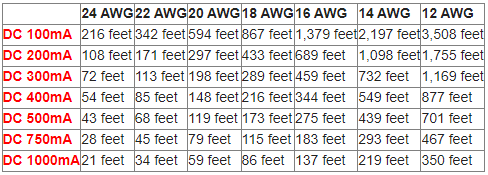
The below DC voltage drop cable distance chart works as follows. The left column notes the amount of power that the device you are powering requires (red text). The “mA” after the number stands for milli-amps. For example, say you are using a CCTV camera that requires max 300mA. Using 18 gauge power cable, you can run your cable up to 289 feet.