Author Archives: admin
HiTools Delivery just replaced SADP Tools as Hikvision NVR and IP camera utility
SADP tools is discontined.
HiTools Delivery can be download here:
https://www.hikvision.com/ca-en/support/tools/hitools/cl7f0143d2c781a3e3
How to check if a remote port is open ,using CLI in Linux
$ nc -zv <hostname> <port>
By using this command, you don’t have to install nmap.
Encouter a “Windows bootmgr encoutered a security violation or Internal error” if Secure Boot is enable When trying to install Windows 11 on a Dell 7060 PC
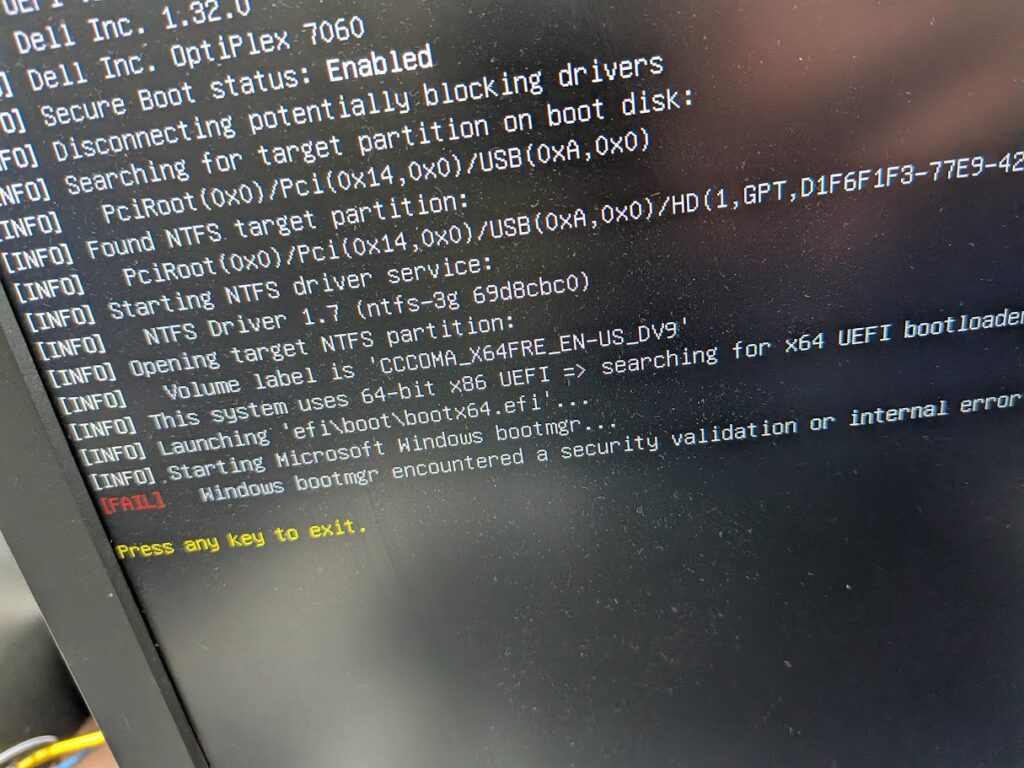
PC: Dell 7060 SFF
SSD: Old Patriot P210 III 512GB
Installation media: up-to-date Win 11 ISO on flash drive
After I disabled secure boot, it allowed me to do the installation.
I felt it was strange so I checked and found out the SSD is too old, I replaced with a newer WD SSD and enable Secure Boot in BIOS, no problem to do the installation of Win 11.
So, it is the SSD compatible issue.
VHS to Digital Converting
I did VHS videotape converting from a 3-hour long tape to mp4 today.
It took me 3 hours to converting to mkv and another 3 hours converting mkv to mp4.
Tools: VHS player and converter.
Software:PotPlayer

how can i change my real picture to cartoon

I was asked by a client about this question and I showed her how to make one in this website, https://imagetocartoon.com/. Just upload real picture and choose the available style and convert,then download. It is free. I created one for myself. 🙂
Solution: Old Surfacebook Pro 5 Lost Wifi After Sleep Mode on Windows 11 Pro/Home
Complain: I have a Surfacebook Pro 5. Constantly, when the laptop goes to sleep mode and wake up, the Wifi lost and the Wireless adapter under Device Manager gets eclaimation mark, I have to delete the wireless adapter, reboot laptop, join the Wifi again to make it works again,
Solution: This is a common driver compatibility issue. Please try disabling Fast Startup.
- Open the Control Panel by typing “Control Panel” into the Windows search bar and hitting Enter.
- Navigate to “Hardware and Sound,” then select “Power Options.”
- On the left-hand side, click on “Choose what the power buttons do.”
- Click on the link that says “Change settings that are currently unavailable” to unlock the settings.
- Uncheck the box that says “Turn on Fast Startup (recommended).”
- Click “Save changes” to apply the new settings.
Disabling Fast Startup means your computer will take a little longer to boot up, but it can help solve various issues related to updates and hardware compatibility. To completely fix this issue, you may need to wait for system and driver updates.
HP Stops Providing Old Printer Drives on its Website
I encountered a HP Officejet 4500 drivers downloading problem from www.hp.ca.
When I search “HP Laserjet 4500 Wireless ” on the model box, it prompt “This is a discontinued model and we don’t provide the drivers any more”.
The alternate way for this kind of issues is Google the drive from HP website forum but be careful not download the “fake” one which includes the virus or redirect to some unhealthy websites.
Telus/Rogers Router AP mode vs Bridge Mode
By default, Telus/Rogers Routers are in AP mode, use as a router , prividing Internal IP addresses to computers and other “Smart” devices in the LAN;
But, when users want to use their own router, they have to set the Telus/Rogers router to bridge mode. By doing this, the users own router can have pubic IP ,for some particular reasons(to “dial in”, to port forwarding some devices to Internet,etc).
In conclusion,Bridge mode disables routing/NAT on the Telus/Rogers gateway and The Telus device acts only as a modem. That means Telus/Rogers assigns the public WAN IP directly to your own router’s WAN port.